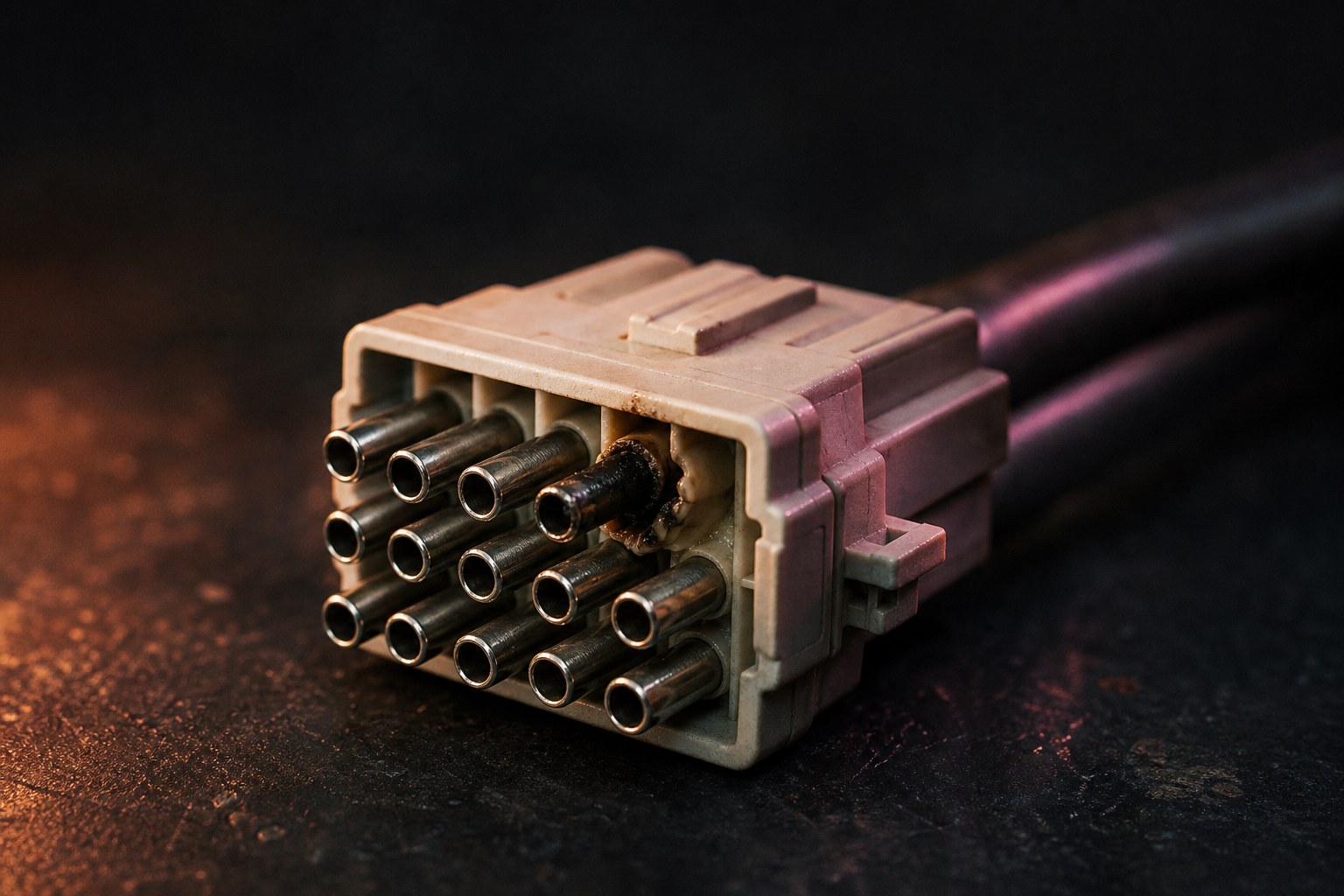
A post went up on r/StableDiffusion today with a photograph most people in this hobby should look at. The author discovered MiniMax H3, started generating in mid August, and on 20 September their computer began shutting down whenever a render started. The socket on the card had melted. They had run that RTX 4090 for three years without a problem.
Their own reading is that sustained AI load did it, especially batches and overnight runs.
We cannot confirm that and nor can anyone else from a photograph. A melted connector has several possible histories and the person holding the card is the only one with the evidence. What we can do is explain the mechanism this failure class actually has, because it is documented, and because it makes the timing look less like a coincidence than it first appears.
Why a change in workload can expose an old connector
The 16 pin connector on these cards carries its current across six power pins wired in parallel. Current takes the path of least resistance, so if one pin sits slightly lower, or is slightly dirtier, or is not quite fully home, that pin takes more than its share.
The margin for that is thin. The design rating is in the region of 8.3 amps per pin, and the connector family it comes from is rated at about 8.5. One poor contact can push a neighbouring pin over its rating, and there is very little headroom absorbing the difference. The revised 12V-2x6 version shortened the sense pins so a partly seated plug is caught before it is energised, which addresses one cause without changing the load balancing underneath.
So a marginal connection is not usually a sudden event. It is a condition that has to be heated long enough to deform plastic.
That is the part a workload change affects. A gaming session is bursts with gaps: a loading screen, a menu, a cutscene, a pause. The card cools, and so does the plug. A render queue has none of that. It is continuous draw for as long as the queue is long.
Nobody needs to claim AI melts connectors. The honest version is narrower and more useful: hours of uninterrupted full load remove the recovery time that was quietly keeping a marginal joint survivable.
What that looks like in hours
This is the part we can put numbers on, because they are ours.
A single longform episode here costs between five and ten hours of GPU time. One of ours was 5.1 hours of rendered beats, another 9.7 across a day, and that is after we learned to keep clips short. Our own build writeup has carried the same warning since July, that generation runs hammer the card for 40 to 60 minutes at a stretch and a 5090 under sustained video load is not a gaming duty cycle. We wrote that about power supply headroom. It applies just as well to the cable and the plug between the supply and the card.
If you bought a machine for games and have spent the last few weeks discovering local video models, your hardware is doing something this month that it has never done before, on the same plug it has always had.
What to actually do
None of this is a reason to stop. It is a reason to spend ten minutes.
Unplug and reseat the power connector properly, both ends, until it clicks. Most reported failures in this class involve a plug that was not fully home.
Look at the plug while it is out. Discolouration, a brown tinge on a pin, or any smell is a stop sign rather than a thing to monitor.
Avoid a sharp bend right at the connector. Give it a couple of centimetres straight out of the card before the cable turns.
If your power supply has a native cable for this connector, use that rather than an adapter or a daisy chain.
And treat a shutdown as information. The author of that post got a machine that powered off every time a generation started, which is a symptom worth investigating rather than a driver to reinstall. That shutdown was the system behaving correctly.
If something has already melted, stop using it and have it looked at. That is not a repair to attempt because a connector survived the last session.
Where we stand
We run this exact load, for hours at a time, most days, and we have not had this happen. That is one machine’s experience and it is not evidence that anything is safe. The person with the melted socket also had three uneventful years.
The useful takeaway is not a verdict on a connector. It is that moving from gaming to generating changes what your machine is doing in a way that nothing on screen tells you about, and the cheapest response is to go and look at a cable you have not thought about since you built it.
A daily note from our news radar. The week gets the full treatment in the DIY AI Brief every Monday.