The companion episode: Aillex tours her own engine room.
Every image of our presenter, every video, every daily short: one free app on one PC. ComfyUI looks like spaghetti the first time you open it. This guide teaches you to read it, because the graph isn’t an obstacle, it’s the whole superpower.
What ComfyUI actually is
A free, open-source app that runs image and video AI on your own computer. No subscription, no upload queue. The difference from every type-a-prompt website: it shows you the assembly line. Every box is one machine; every wire is a part moving down the line. Websites hide the machine. Comfy hands you the wrench.
Install (it’s a double-click now)
ComfyUI ships as a desktop app for Windows and macOS: installer, launch, done. It bundles everything (Python, dependencies). You’ll want a modern GPU with 8GB+ VRAM for comfort; models download on demand.
Open it, pick the default template, and press Run. That’s your first image: made on your machine, by a model you own, free forever, even with the internet unplugged.
The seven boxes (read left to right, like a sentence)
- Load Model, the artist’s brain: a checkpoint/diffusion file you downloaded.
- Load CLIP, the translator that turns your words into what the artist understands.
- Prompt (positive), your wish.
- Prompt (negative), your warning: what you don’t want.
- Empty Latent, the blank canvas, in the model’s compressed dream-space.
- KSampler, the painter. Starts from pure noise, refines pass after pass into your picture.
- VAE Decode → Save Image, develops the dream into real pixels, then the shutter clicks.
One quiet hardware note before you start collecting checkpoints: they’re 2-15GB each and they multiply fast. A 2TB NVMe (~$100) dedicated to models is the single upgrade every ComfyUI user wishes they’d made sooner; our model folder passed 1TB months ago.
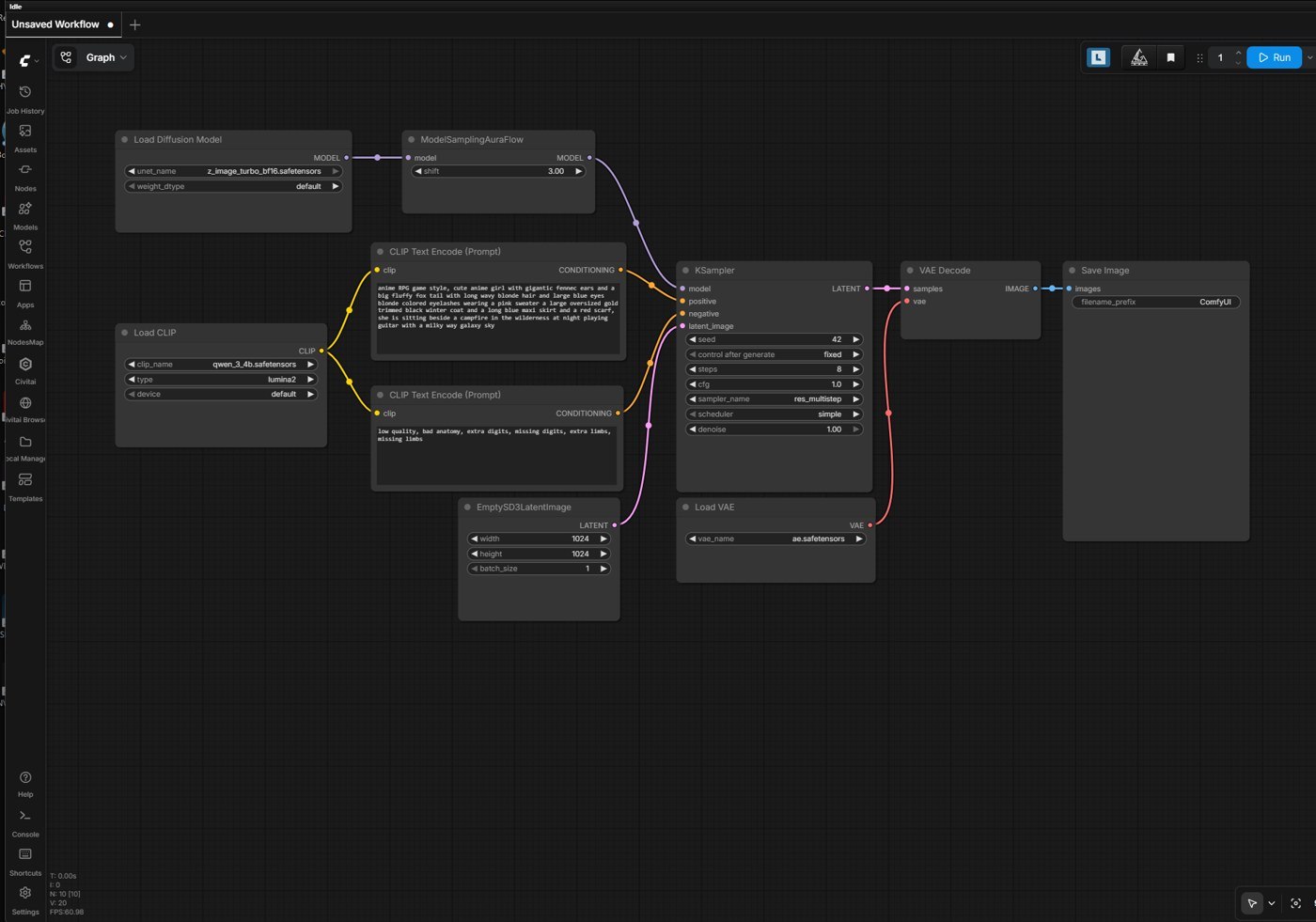 The default graph, every image on this channel starts life in a window like this.
Model, translator, wish, warning, canvas, painter, shutter. Every graph you will ever see is this sentence with more adjectives.
The six dials that matter (all inside the painter)
- Seed, the dice roll. Same seed + same everything else = the same picture. This is how you compare changes scientifically and keep characters consistent across a grid.
- Steps, refinement passes. More isn’t better: fast “turbo” models want 8 to 15; classic models 20 to 30. Too few = mud.
- CFG, how hard it listens to your prompt. Low is jazz, high is obedience, and past the sweet spot, obedience becomes shouting (fried colors, crunchy contrast). Turbo-class models often want CFG near 1 to 2.
- Sampler / Scheduler, the painter’s technique. Copy them from whoever shared the model, and move on with your life.
- Resolution (on the Empty Latent), generate near the model’s native size; upscale later.
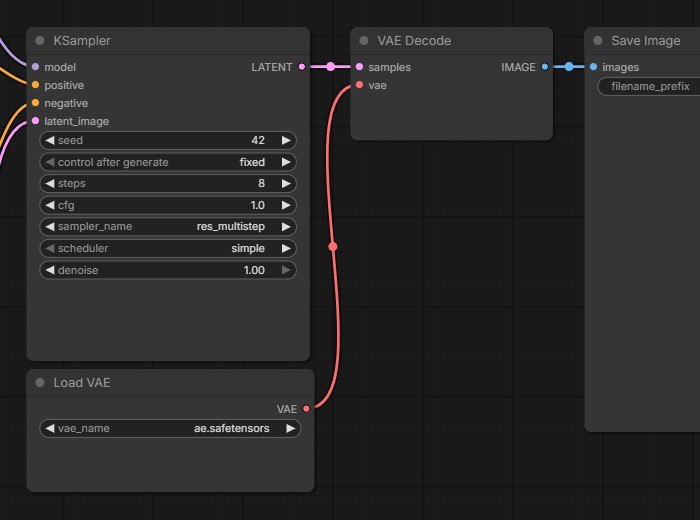 The six dials that matter, in the flesh.
Prompt craft that actually works
(parentheses)are volume, turn a phrase up; stack to(((triple))).[brackets]turn it down.- ALL-CAPS does nothing. Ask us how we know.
- If the model keeps ignoring something, say it again. Repetition is legal.
- “eyes” implies two of them, describe a single feature in the singular if you want asymmetry (a wink is “one brown eye, and closed eye… wink, wink”).
Your first power-up: the LoRA chain
A LoRA (see our character-LoRA guide) is a small add-on file that teaches the model one new thing. In the graph it’s a node that clips into the wire between the model loader and the KSampler. Chain identity + style LoRAs in a row and you can read the whole recipe at a glance, powers stack by plugging boxes into wires.
The door for robots (why this is a superpower)
The graph saves as a small JSON file, and ComfyUI has an API: a script can knock and say run this graph, with these words. Our entire channel runs on this: a script wakes up on a schedule, loads a workflow, writes a prompt, presses Run, checks the result, and publishes, unattended. The spaghetti isn’t just an interface. It’s a program you drew. Once you’ve drawn it, your computer can run it forever without you.
The Engine Room series
This room is deep. We’re cracking it open one machine at a time:
- Editing images with plain instructions (and combining two)
- Krea 2 prompting and LoRAs, from our own bench
- Video in the graph
- Upscaling and detail
- One image → a 3D model
- The full character content pipeline
Watch the companion episode on YouTube → @AskAillex, Aillex tours her own engine room. Questions? Join r/aillex.