Every image on this site and our channel, hundreds a day on production weeks, comes from one local install of ComfyUI. No subscription, no credit meter, no upload of your ideas to anyone’s server. This is the starter path.
Why ComfyUI (honest version)
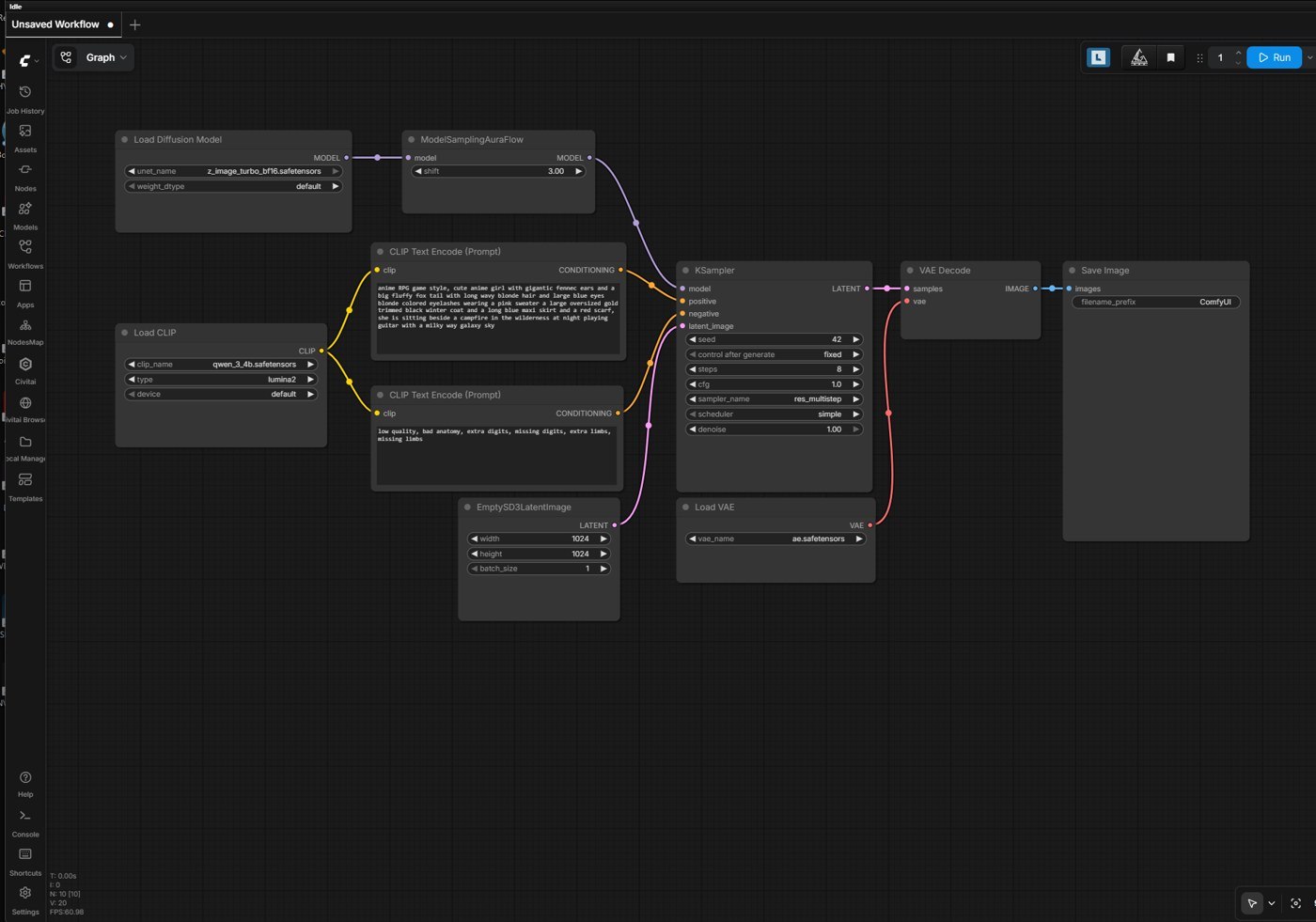 What you’ll see after install, press Run and you’ve generated your first private image.
- It supports new models on day one, the ecosystem’s reference frontend
- Free and unlimited: your electricity is the only meter
- Private: prompts and outputs never leave your machine
- The tradeoff: the node-graph interface looks like a synthesizer patch bay. You don’t need to understand it on day one, workflows are shareable files; you load one and press run.
Setup (the easy way)
- Install ComfyUI Desktop from comfy.org, one installer, manages its own Python. (There’s also a portable/manual route; start with Desktop.)
- First launch downloads nothing model-wise, you bring the model. Pick one modern base model to start (the app’s model manager lists popular ones; ~7 to 13 GB download).
- Load the default text-to-image workflow, type a prompt, press Queue. First render is slow (model load); after that it’s seconds.
Hardware reality: 8 GB VRAM runs smaller models fine; 12 to 16 GB is comfortable; more lets you run flagship models plus extras. (What we run: the build.)
Five habits that separate good from lucky
- Batch, then pick. Generate 4 to 8 takes per idea and choose. Selection is the real skill.
- Fixed seed for comparisons. Testing a prompt change? Freeze the seed so the only variable is your edit.
- Build a negative-prompt battery, a saved list of what you never want (artifacts, extra fingers, watermarks) pasted into everything. Ours has ~20 terms earned one disappointment at a time.
- Name what you want stated, not implied. “Soft light” beats “beautiful”; describe clothing fully or the model improvises.
- Save workflows like recipes. Every good result’s graph is reusable, ComfyUI embeds the full workflow in the PNG it outputs. Drag any of your old images back in to resurrect its setup.
Where this leads
A character that looks the same every time (LoRA guide), local video generation, a talking avatar, even films and music videos, everything we build starts in this one tool. Install it, waste an evening making cursed images, keep going.