Qwen Image 2.1 came out on 20 September. It is Photoshop by typing: change the outfit, swap the background, relight the room, all from one sentence. We ran it against Krea 2, FLUX.2 Klein 4B and our own production editor, Qwen Edit 2511, on 252 edits of faces alone.
Every number on this page is from one RTX 5090 and three seeds per test, one prompt shape. Read it as a starting point for your own photos, not a law about the models.
Presenter shots in the video were generated with MiniMax H3, by MiniMax, used under the MiniMax H3 licence.
What Qwen Image 2.1 is
One model from Alibaba’s Qwen team (7.1B, with an 8B Qwen3-VL text encoder) that makes pictures, edits them with up to ten reference photos, and can output a transparent PNG. It is in ComfyUI core from version 0.37.0: the nodes are TextEncodeQwenImage21 and QwenImage21Cache, and the official templates are under Templates.
The licence is research-only. Pictures you make are yours; a paid product built on the model needs a separate licence. The full breakdown is in DIY AI Brief #12. Qwen Edit 2511, the editor we use in production, keeps its Apache 2.0 licence.
Which files to download
| file | size | our timing |
|---|---|---|
qwen_image_2.1_bf16.safetensors | 14.2 GB | edit 11.6 s, ~27 GB peak |
qwen_image_2.1_int8_convrot.safetensors | 7.3 GB | edit 6.1 s, ~20 GB peak |
| text encoder, bf16 / int8 / w4a8 | 17.5 / 9.4 / 6.3 GB | |
| VAE | 0.68 GB | |
| prompt enhancer (optional, t2i and i2i) | 9.5 GB each | 4 to 49 s per rewrite |
Grab the int8 file. On our card it made the same edit as the bf16 file in half the time, with the same face score (0.972 vs 0.971 on the garment edit).
Does your face survive the edit?
Three edits that should leave a face alone: change the clothes, swap the background, relight the scene. Seven faces (four Pexels photos, two synthetic people and our presenter), three seeds each, every editor at its own recommended settings. ArcFace, a face-recognition model, scored every result against the original: 1.00 is the same face.
| editor | face match (median) | seconds | peak VRAM |
|---|---|---|---|
| Qwen Image 2.1 (bf16, 25 steps) | 0.960 | 11.6 | 26.8 GB |
| Qwen Edit 2511 fp8 (20 steps) | 0.949 | 36.9 | 31.1 GB |
| FLUX.2 Klein 4B (20 steps) | 0.933 | 4.7 | 19.3 GB |
| Krea 2 + Identity Edit LoRA v1.2 (10 steps) | 0.828 | 8.4 | 22.2 GB |
What the pictures show:
- Krea 2 moves the person on a background swap. Asked for a snowy street, it took away the table and cup, crossed her arms and reframed the shot on every seed. Qwen 2.1 kept the table, the cup and the pose.
- Edit 2511 redraws the whole frame. We planted a sign in every photo that nobody asked any editor to touch. Qwen 2.1, Klein and Krea copied it; Edit 2511 erased it on 3 of 3 seeds.
- A high face score can mean a timid edit. On the relight, Qwen 2.1 kept the man best (0.91 to 0.95) because it changed the light least: the green rim light from the original is still there. Klein baked an orange glow onto the skin (0.53 to 0.63).
Plastic skin: where it actually landed
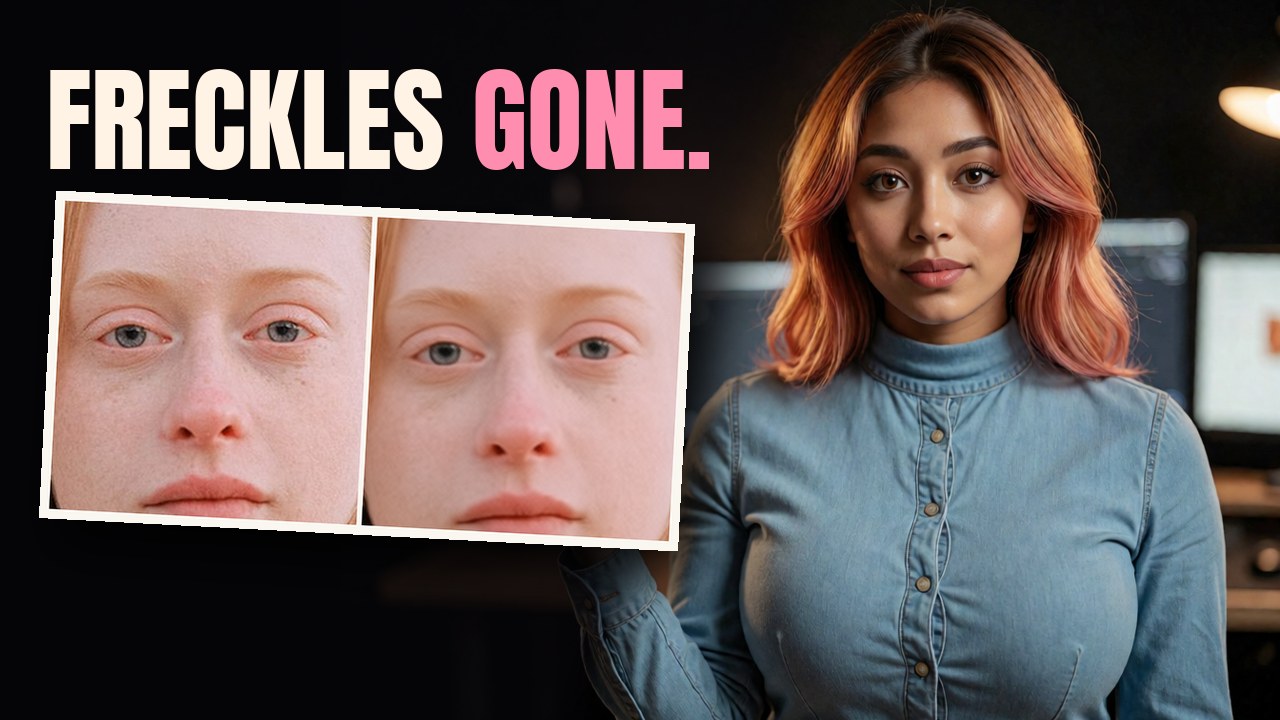
On the freckles test, Qwen 2.1, Krea 2 and Klein kept her freckles through a garment change. Edit 2511 smoothed them away on all three seeds. The plastic-skin complaint attaches to our own production editor on this bench, not to Qwen 2.1.
For brand-new portraits (three invented people, nine setups, faces at 1:1), Qwen 2.1 draws pores, fine lines, soot and sweat, and Krea 2 Turbo had the smoothest skin of the nine. Adding “Skin imperfections” to the prompt barely changed anything. Envy’s Fix 1.0 LoRA changed the composition, not only the texture.
A side view from one photo
Ask Qwen 2.1 for one view, a left side profile, and you get a full-size profile that still looks like the person: 9 of 9, 11.6 to 13 s each, no LoRA. A back view works the same way.
- Qwen Edit 2511 with the
Qwen-Edit-2509-Multiple-anglesLoRA also gives a clean profile, in 47 to 54 s. - Asking Qwen 2.1 for all three views on one wide sheet (2048 x 768) works, but the figures are small, and from a waist-up photo it invents the legs.
- Our own Krea 2 character-sheet workflow gives excellent front, back and head panels, and a grey mannequin for the side.
Two photos, one jacket: the wording does not matter
Photo 1 a person, photo 2 a jacket, put the jacket on the person. We tried six wordings on Qwen 2.1: the official <image1> / <image2>, img1, image1, “the first image”, “Picture 1”, and no reference words at all. 36 of 36 put the jacket on and kept the face, the pose and the sign. Use the official <imageN> and move on.
About half came back as the reference’s four-pocket chore jacket and the rest as a simpler shirt jacket. Krea 2 drew the most faithful jacket every time and re-posed the person every time. Edit 2511 got the jacket, cropped in tight on every cell, and took 60 to 77 s.
Face swap and pose copy
We ran these on synthetic people only.
- Qwen 2.1 and Krea 2 swap the head, not the face: the donor’s face, hair and sometimes shirt. Measured against the donor, Qwen 2.1 scored 0.95.
- Edit 2511 did a clean face-only swap on 2 of 3 seeds of one pair, changed nothing on the third, and on the other pair produced a third person on 3 of 3.
- Pose copy drags the reference’s clothes along. Hand Qwen 2.1 a photo of someone with crossed arms in a grey tracksuit and your person takes the pose and the tracksuit (6 of 6). The VNCCS PoseStudio LoRA did better even fed a photo instead of the mannequin render its author uses: arms crossed on 5 of 6, the person’s own top kept on 6 of 6, though 3 of 6 still took the reference’s trousers or shoes.
The prompt enhancer
Qwen ships two 9.5 GB rewriters (Qwen 3.5 fine-tunes) that turn a short prompt into a long description. They were added to the official ComfyUI template on 25 September behind a refine_prompt switch that ships off, and each rewrite costs 4 to 49 s on our card.
At the template’s settings, 6 of 8 text-to-image rewrites began with the enhancer’s own reasoning, “I first separate what is fixed from what is open…”, plus a stray </think>, and all of it went into the prompt. The images still came out coherent.
The fix: set the TextGenerate node’s thinking input to true. 8 of 8 came back clean. Or leave the enhancer off and write the paragraph yourself. When it works, the edit rewriter reads your photo: it named our planted sign as something to keep. This is the template as of 25 September; check whether it has changed.
The one setting: resolution
TextEncodeQwenImage21 has a resolution input, and it is a pixel budget. 0 means “encode my photo at full size”. With a 4.2 MP photo and two references, resolution 0 took 129 s; the same edit at 1024 took 14 s. A phone photo is 12 MP. Set it to 1024.
- Native 2K (2048 x 2048) costs about 5x 1K: 9.2 s vs 47.5 s on bf16, 4.5 s vs 28.8 s on int8.
- The edit path works as an upscaler: run a finished 1024 image back through at a 2048 budget with “add detail, change nothing”. Individual pebbles and grain came back where a Lanczos 2x goes soft, 3 of 3 seeds, about 69 s a frame.
Callouts, not a winner
| if you want | reach for |
|---|---|
| a face kept | Qwen Image 2.1 (0.96) |
| speed | FLUX.2 Klein 4B (4.7 s) |
| the clothes from a reference | Krea 2 (it moves the person) |
| the sign and the freckles kept | not Edit 2511 |
Every workflow we ran is in the kit, ep49-qwen21-face-test-kit.zip (173 KB), as ComfyUI API json, with the bench scripts and every result row: single-image edit, two-reference edit, the turnaround sheet, both enhancers, the transparent PNG path and the 2K path. Run it on your own photos and tell us what your face did.
One RTX 5090, three seeds per test, one prompt shape, ArcFace as the face instrument. The four real people are Pexels photos licensed for editing.