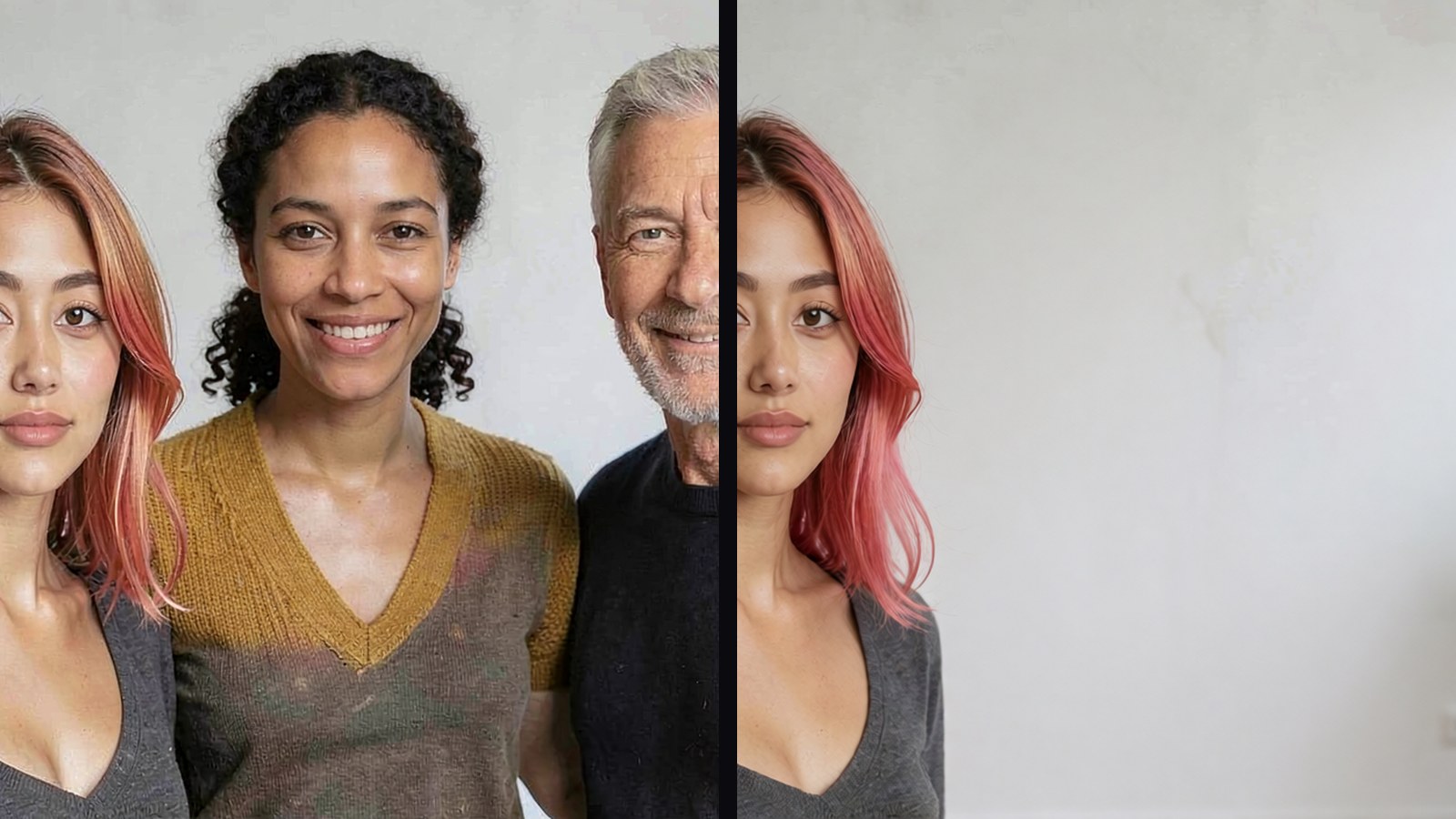
Everyone has this photograph. Three people, and you only want one of them in it. Photoshop does it with a lasso, a content-aware fill and twenty minutes of fixing the edges. We wanted to know whether a model running on our own desk does it in one sentence.
Five of them tried, all free, all running locally on one RTX 5090: Krea 2 Identity Edit, Qwen Image Edit 2511, FireRed 1.1, FLUX.2 Klein 4B and SenseNova U1.5. Every prompt below is the exact one we typed. Every number is our own box, 229 measured runs, two days, our prompts and our seeds.
The five workflow files, the mask graph, the layers graph and every timing row are free. No email.
The photographs are our own generated stock. No real person’s photo was edited for this.
The cost, up front
On this job the five take between twelve and seventy-five seconds each, and the smallest peak memory any of them hit was twenty-six gigabytes. That is not a twenty-four gigabyte card. It is a 5090 or a cloud box. We would rather say that here than at the end.
| editor | seconds to take two people out | notes |
|---|---|---|
| FLUX.2 Klein 4B | 12 | Apache 2.0, the quickest. There is a 9B version that is not free to use commercially; we describe it and do not show it |
| Krea 2 Identity Edit | 18 | the fast one; edits in place |
| FireRed 1.1 | 39 | the cinematic one; re-stages the shot |
| Qwen Image Edit 2511 | 51 | the one our July bench ran on |
| SenseNova U1.5 | 75 | the newest; the best rebuilds, and one thing it cannot do (below) |
Try one: the sentence that empties the room
Krea 2 first. The prompt:
Remove everyone except the woman with pink hair on the left. Rebuild the room behind them so she is standing alone.
Eighteen seconds, and we got an empty room. Not her alone. Nobody. A plant, a window, a wall. It had removed her too. Three seeds, three empty rooms.
So before blaming the model we changed exactly one thing.
Try two: say who leaves, not who stays
Same model, same seed, same photograph:
Remove the woman in the mustard cardigan and the older grey-haired man from the photograph. Keep only the woman with pink hair. Rebuild the white wall, the window and the plant behind them so she is standing alone in the room.
There she is. Standing exactly where she was, wall and plant rebuilt behind her. Three seeds, three for three. One grammatical change took Krea 2 from zero of three to three of three.
Then look closely at seed two. She is wearing the mustard cardigan that belonged to the woman we just deleted. On two of the three seeds the model kept her and dressed her in the other woman’s clothes. The sentence fixes who survives. It does not fix what they end up wearing, and you only catch that at full size. That is the shape of the whole job: the failures that matter come back looking like a success.
Rule one: name who leaves. Then check what the survivor is wearing.
The other three engines
The “say who leaves” sentence went to Qwen, FireRed and Klein. All three keep her. All three also turn her to face the camera, move her to the middle of the frame, and Qwen gives her a new top and jeans. They do the job by re-staging the photograph. Only Krea 2 left her where she stood.
If the pose and the position matter, that is a real difference between editors that no speed table shows you.
Build the group that never happened
The other half of what people want from a group photo is putting someone in. The reunion where one person could not make it.
Three separate photographs, three people, one prompt:
Create a full-length group photograph, head to feet, of the woman from the first image standing with the two people from the other images in a bright open room. All three are fully visible from head to feet.
At chest height, in landscape, every engine does this convincingly. Ask for the same three people full length and start counting. Krea 2 gave us three people, two of them the same man. Klein did the same. Qwen gave us two people and a perfectly good photograph; if you were not counting you would never notice someone was missing. FireRed gave us three distinct people, one of whom was not the woman we handed it.
Then SenseNova: five reference photographs, five people who have never met, one prompt, five people back, all distinct, all recognisable, full length. It is built around an ordered list of references and it shows.
Rule two: count the people before you look at anything else. If the cast matters more than the speed, the slow one is the one.
Draw a box
Anyone who has used Photoshop knows this fix. To show it we used a different photo: a white van outside a bakery. Our own image generator misspelled the awning, BAKREY, and that mistake turned out to be the most useful thing in the test, because it is a detail an honest edit must leave alone and a re-render cannot reproduce.
Ask Qwen to remove the van and it does. Van gone, shopfront rebuilt, convincing. And the awning now says BAKEEY. The shop next door has gone. The bicycle has moved. Nothing in the sentence asked for any of that. The model repainted the whole picture and happened to leave a bakery in it.
Draw a box round the van (in ComfyUI: a mask through VAEEncodeForInpaint, the graph is in the kit)
and the model may only paint inside it. Thirty-nine seconds instead of fifty-one, because it is solving
a smaller problem, and everything outside the box is the original photograph. BAKREY. Bicycle where it
was. Shop next door still there.
One setting controls how far the box grows before painting, and you can read it off the sign: at sixteen pixels BAKREY survives; at sixty-four the box reaches the awning and rewrites it.
Rule three: if the rest of the photo matters, draw a box. Four of the five will take one. SenseNova will not: it does the whole job inside itself and never hands anything to the part of ComfyUI that takes a mask. Best rebuilds in the test, and no way to confine it. A trade, not a flaw.
The thing we said was impossible
In July we wrote, in capital letters, that Qwen Image Layered cannot decompose an existing photograph. We had run a real test and got a flat image back twice.
We ran it again on the official Image to Layers workflow, which uses nodes our July graph never touched, and gave it the group photo. Out came the two women with the man removed and the wall rebuilt, and the man on his own. Ask for eight layers instead of four and the first thing it hands you is the empty room: all three people gone, wall and plant intact, fifty seconds. That is the cleanest route to a background we have.
Naming a person changes what it does and you cannot rely on it. “Separate the woman with pink hair onto her own layer” gave four clean layers, the best result in the whole test. The identical sentence about the woman in the cardigan, same photo, same seed, gave two composites and two frames of noise.
Rule four: to cut a person out, ask the layered model for eight layers and pick from what comes back. Asking for more layers is a better lever than asking for a person.
Four things that went wrong
Every mistake in this test was ours first.
- The room that came back empty. Fixed by the sentence.
- The cardigan on the wrong woman. Caught only at full size.
- SenseNova sat at thirty-one and a half gigabytes on a thirty-two gigabyte card and never produced a
picture, and we wrote down that it does not fit. It fits fine. The attention setting defaults to a
library that was not on our machine, every run died with an error that looks exactly like running out
of memory, and the fix was one dropdown (
attn_backend: sdpa). - The first time we ran the body test, the reference we handed every model was cropped at the collarbone. There was no body in it to keep. We very nearly published that as a finding about models.
Before you believe a result about somebody else’s model, audit your own setup.
What to reach for
| the job | reach for |
|---|---|
| two people out of a photo | name who leaves, not who stays; check the survivor’s clothes |
| the rest of the photo matters | draw a box (masked inpaint) |
| the group that never happened | SenseNova, knowing you cannot confine it |
| touch nothing you did not mention | Krea 2 Identity Edit |
| a person cut out on their own layer | Qwen Image Layered at eight layers, then pick |
The companion piece, on why these editors keep a face and lose a body, is here.
Take the files
ep43-photo-edit-kit.zip: the five ComfyUI workflows exactly as run, the masked-inpaint graph, the image-to-layers graph, every timing row as JSON lines, and the findings file with the tables. If it goes differently on your card, tell us. The thing we were most certain about seven weeks ago is the thing this test had to take back.
Covered in the DIY AI Brief, Ep. 11, with the week it landed in.